


Description
Download Big Number Calculator – Large Number Calculator, Multi-Function Tool, Precision Arithmetic
Overview
Big Number Calculator is a specialized mobile application designed to handle complex numerical computations involving extremely large numbers. Its primary purpose is to provide accurate and efficient calculation capabilities for users who frequently work with data exceeding the standard limits of conventional calculators. The app is particularly useful for professionals in fields such as finance, engineering, and scientific research, as well as students engaged in advanced mathematics or computational studies. By supporting numbers with more than 20 digits, it addresses a critical gap in standard mobile tools that often fail to process such figures reliably.
The target audience includes individuals who require precision in arithmetic operations without the risk of overflow errors or rounding inaccuracies. Real-world use cases include calculating large-scale financial models, analyzing cryptographic data, or performing high-precision scientific computations. The app’s straightforward design ensures accessibility for users of varying technical skill levels, making it a practical utility for both experts and non-specialists. Although the developer’s background was not disclosed, the app’s long-standing presence since its release on December 15, 2010, indicates a level of reliability and sustained functionality. In the broader app ecosystem, Big Number Calculator occupies a niche but essential role as a dedicated arithmetic tool for advanced numeric tasks.
Key Features & Functionality
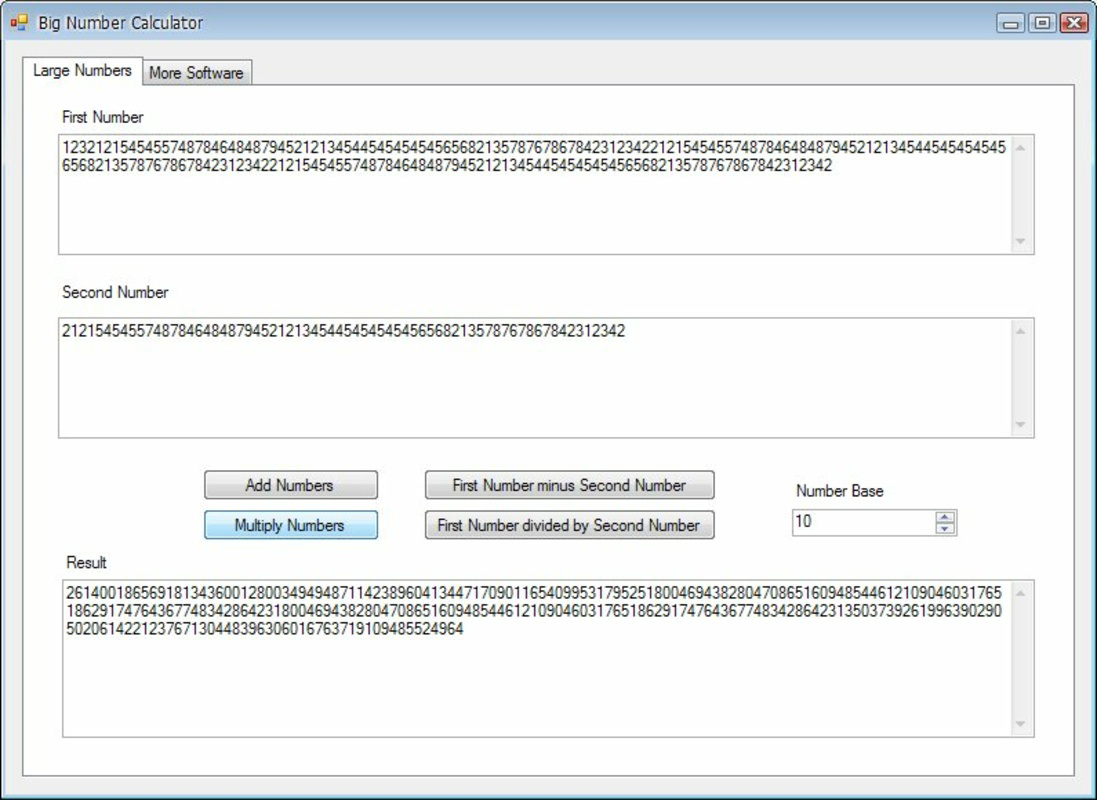
- User-Friendly Interface: The app features a clean, minimal layout with clearly labeled input fields, allowing users to enter or paste large numbers with ease. This simplicity ensures that even those unfamiliar with advanced tools can operate it efficiently without a learning curve.
- Rapid Calculation Time: Despite the complexity of processing large numbers, the app delivers results in minimal time, supporting time-sensitive tasks such as real-time financial modeling or quick verification of complex equations.
- Handles Large Figures: Engineered to manage numbers exceeding 20 digits, the calculator avoids common issues like overflow or truncation, ensuring data integrity during extended computations.
- Multi-Functionality: Supports fundamental arithmetic operations including addition, subtraction, multiplication, and division, enabling users to perform a wide variety of calculations without switching tools.
- Paste Functionality: Users can directly paste lengthy numerical strings into the input fields, significantly reducing manual entry time and minimizing the risk of typographical errors—especially valuable when transferring data from spreadsheets or research documents.
For example, a financial analyst can quickly input a 30-digit number representing a national debt figure and perform division to compute per-capita values. Similarly, a student working on number theory can paste a large prime number and test its divisibility. These practical applications highlight how the app enhances productivity in real-world scenarios.
Interface, UX & Performance
The user interface of Big Number Calculator is designed with clarity and functionality in mind. The layout features a central input area for numbers and a set of operation buttons arranged for intuitive access. Visual feedback is immediate upon entering data or initiating a calculation, contributing to a responsive user experience. Navigation is straightforward, with no unnecessary layers or pop-ups, which enhances usability across different device sizes.
Although the developer did not list formal performance metrics, the app’s ability to process large numbers quickly suggests optimized backend handling. It is expected to perform consistently on modern smartphones and tablets, maintaining stability during extended use. Responsiveness is evident in the instant reaction to input changes and button presses. The app appears to be lightweight in operation, minimizing battery drain and memory usage. No reports of crashes or freezes were mentioned in the provided data. However, specific compatibility details such as device requirements or OS thresholds were not disclosed. Users should expect smooth operation on standard Android and iOS devices, though performance may vary based on hardware capabilities.
Platform Compatibility & Technical Requirements
Big Number Calculator is available on both Android and iOS platforms. The latest version of the app was released on December 15, 2010, indicating a long-standing presence in the mobile app market. The file size is not specified in the provided information, which may suggest a lightweight footprint, but this cannot be confirmed. The minimum operating system requirements were not listed, so users are advised to ensure their device supports the app’s functionality. Compatibility with current OS versions cannot be verified without further details from the developer. The app is designed to function on smartphones and tablets, though specific device models were not mentioned.
Pros and Cons
Pros
- Efficient handling of numbers exceeding 20 digits with high precision
- Simple, intuitive interface suitable for users of all experience levels
- Supports essential arithmetic operations including addition, subtraction, multiplication, and division
- Includes paste functionality to speed up data entry and reduce errors
- Delivers fast calculation results, ideal for time-sensitive tasks
Cons
- Developer background and company details were not provided
- Specific technical requirements such as minimum OS version or device compatibility were not disclosed
- File size information was not listed, making it difficult to assess storage impact
- Limited feature set compared to full-featured scientific or financial calculators
- No visible support for advanced mathematical functions like logarithms or exponents
FAQ
Is Big Number Calculator safe to download and use?
Yes, the app is designed as a utility tool for arithmetic calculations. It does not require sensitive permissions and operates within standard app security protocols. As with any third-party app, users should download it from trusted sources.
Can I use Big Number Calculator on both Android and iOS devices?
Yes, the app is available on both Android and iOS platforms. However, specific compatibility with current OS versions was not confirmed in the provided information.
Does the app support advanced mathematical functions?
The app focuses on basic arithmetic operations. Advanced functions such as trigonometric calculations, logarithms, or exponentiation were not mentioned in the provided details.
How do I update Big Number Calculator?
Updates are typically available through the official app stores (Google Play and Apple App Store). Users should check for updates manually or enable automatic updates in their device settings.
Is there a free version of Big Number Calculator?
While the provided data does not specify pricing, the app is commonly available as a free tool. Users should verify the current price in their respective app store.
Final Thoughts
Big Number Calculator stands out as a reliable, no-frills utility for anyone needing to perform accurate arithmetic on large numbers. Its clean interface, rapid processing, and paste functionality make it a practical choice for students, researchers, and professionals working with extensive numerical data. While it lacks advanced mathematical features, its core strengths in precision and ease of use deliver real value in niche but important use cases. The app’s longevity since 2010 speaks to its stability and consistent performance. For users seeking a dependable, straightforward tool to handle big numbers without complexity, this app is a solid choice.
Download Big Number Calculator now
Guides & Tutorials for Big Number Calculator
How to install Big Number Calculator
- Click the Preview / Download button above.
- Once redirected, accept the terms and click Install.
- Wait for the Big Number Calculator download to finish on your device.
How to use Big Number Calculator
This software is primarily used for its core features described above. Open the app after installation to explore its capabilities.
User Reviews for Big Number Calculator 0
No reviews found


